Sign in

Slowbro - Meet 1 Signup!

Hey Slowbros!

  • Reminder to sign up ASAP for the first meet this Sunday at Tallyho! Warmups at 8:00am. Meet start at about 9:00am.
  • Entry limits are 3 individual events + 2 relays or 4 individual + 1 relay. Doesn't really matter what you want to do. Do 1 event if that is what you want to do! Do only relays! We have a 100m Medley and 100m Free relay. I'll be putting down about 3-4 relays for our squad pending on how many people sign up for the meet.
  • Practice Availability Form
  • Practice Form Results (Call someone you want to swim with!)
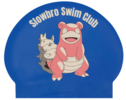
  • Caps are available! See attached. They look GREAT. They will be $5 each and payment can be made to Cara via cash or Zelle (240-994-8413). She'll be at the first meet, so you can pick them up there or if you see her around the pool!
  • BTW Geoff finally registered and is all signed up for the first meet. 
  • We have over 70 Slowbros this year. Can't wait to go slow and still win? Or lose. Who cares, this is just for fun.
  • Anyone interested in bringing some mimosas or bloody mary beverages to the first meet? Non-glass containers? For sharing? We can mix it with red-bull and go really fast? IDK. Someone bring some donuts?
  • Except we do have some 18, 19, and 20 year olds. So they cannot have it. Sucks for you. You get to come up with a team cheer though. Hooray for you.

-Akshay

Add Snippet

This page is for "Posts"

This page is designed to work with our blog engine (Manage Team > Website > Posts, or you can add a post by going to Manage Site > Add News Post). Once you have created some posts, you will see them on this page (and you will want to edit or remove this footer).

This page should not be repurposed or deleted, although you can change the name of the page, and it can be moved to somewhere else in your navigation, or hidden from navigation if you don't want it to be seen (go to Manage Site > Edit Navigation > select page "Properties," then check "Hide From Navigation"). 

Posts are also used in conjunction with the "Recent News" snippet. See our Help Center article on Posts.


This content is in your "News” Template and can be easily edited or deleted as you create your own content: go to Manage Site > Edit Template Content and click on the pencil icon in the upper right corner of this Text Area.The “News” Template has only been applied to this page, it uses the Default Layout, thus has a right sidebar (which is currently empty). If you’d like to change the Template that’s assigned to this page, see our Help Center article on the topic here.

You may rename or move this page, but you may not delete it:  go to Manage Site > Edit Navigation. For more information, see our Help Center article here.

Text Area
Simple formatted text
Delete Edit_snippet